Table of Contents
- DeskDirector Connector Overview
- Triggers
- Actions
- Trigger Details
- Action Details
- Create a contact
- Create a ticket
- Create an email from template
- Find companies
- Find contacts
- Find members
- Find ticket task templates
- Get a chat session
- Get a company
- Get a contact
- Get form result
- Get a member
- Get a ticket
- Get ticket tasks
- Invite users to chat
- Respond to an Advanced Event
- Run an advanced action
- Send a notification to a contact
- Send a notification to a member
- Send a system message in chat
- Update a ticket
DeskDirector Power Platform Connector Reference

- DeskDirector Connector Overview
- Triggers
- Actions
- Trigger Details
- Action Details
- Create a contact
- Create a ticket
- Create an email from template
- Find companies
- Find contacts
- Find members
- Find ticket task templates
- Get a chat session
- Get a company
- Get a contact
- Get form result
- Get a member
- Get a ticket
- Get ticket tasks
- Invite users to chat
- Respond to an Advanced Event
- Run an advanced action
- Send a notification to a contact
- Send a notification to a member
- Send a system message in chat
- Update a ticket
DeskDirector Connector Overview
DeskDirector automates and accelerates ticket-based workflows between users and agents in your environment. The DeskDirector connector is a deep and powerful integration into our rich ticketing platform. All phases of a ticket's life cycle can be automated and enhanced for a superior service experience.
Triggers
Name | Description |
This operation triggers a flow when a service ticket has been created or updated. | |
This operation triggers a flow when a portal chat session has been created or updated. | |
This operation triggers when a selected event runs in your DeskDirector instance. | |
This operation triggers based on advanced events within your DeskDirector instance. |
Actions
Name | Description |
Creates a contact in your DeskDirector instance. | |
Create a ticket for the specified contact. | |
Generates an HTML document from a dynamic email template. | |
Find companies by keywords or filters. | |
Find contacts by keywords or permissions. | |
Find members by keywords or permissions. | |
Find ticket task templates by keywords or filters. | |
Retrieve a specific chat session's details. | |
Retrieve a specific company's details. | |
Retrieve a specific contact's details. | |
Retrieve a specific form submission's content. | |
Retrieve a specific member/agent's details. | |
Retrieve a specific ticket's details and content. | |
Retrieve a specific set of ticket tasks. | |
Invite users to a real-time chat session. | |
Respond to one of DeskDirector's Advanced Events. | |
Run an Advanced Action in DeskDirector. | |
Sends a notification to a contact in DeskDirector portal. | |
Sends a notification to a member in DeskDirector tech. | |
Reply to a specific ticket or chat with a system message. | |
Update a specific ticket with new details or content. |
Trigger Details
When a ticket is created or updated
This operation triggers a flow when a service ticket has been created or updated. It will skip any ticket that the ticket contact doesn't have permission to view.
Parameters
Name | Type | Description |
Event | Dynamic List | The type of event you would like to subscribe to. |
Name | String | Specify the name of the workflow. This name will appear in your DeskDirector instance under the Events tab in the Admin Portal. We recommend that you give a descriptive name here, as this can help you find which flow an event is tied to. |
Filters | Dynamic List | Boolean | There will be 14 filters that you can use to filter for tickets. These include: Board, Status, Summary, Request, Form, Priority, Source, Company, Group, Ticket Tags, Company Tags, VIP, and Office Hours For dynamic lists, you can input an ID as a custom value if the item you're expecting doesn't appear in the dynamic list. |
When a chat session is created or updated
This operation triggers a flow when a portal chat session has been created or updated.
Parameters
Name | Type | Description |
Event | Dynamic List | The type of events to subscribe to. |
Description | String | Specify a short description for the workflow. |
Type | Dynamic List | Only triggers this flow if chat is of the selected type. |
Status | Dynamic List | Only triggers this flow if chat is in the selected status. |
When a workflow is triggered
This operation triggers a flow when a specified event in your DeskDirector instance is triggered.
Parameters
Name | Type | Description |
Type | Dynamic List | The type of event that will trigger this flow. |
Workflow | Dynamic List | The specific event in your DeskDirector instance that will trigger this flow. |
Description | Dynamic List | Specify a short description for the workflow. |
When an Advanced Event occurred
This operation triggers based on advanced events within your DeskDirector instance.
Parameters
Name | Type | Description |
Category | Dynamic List | The category that your Advanced Event falls under. |
Event | Dynamic List | The specific Advanced Event that will trigger this flow. |
Action Details
Create a contact
This action creates a contact for the DeskDirector Portal.
Required Parameters
Name | Type | Description |
String | Primary email address for the contact that is being created. | |
First Name | String | The contacts first (given) name. |
Company | Dynamic Pickers | Integer | The ID for the company that the user belongs to. |
Last Name | String | The contacts last (sur) name. |
Title | String | The contacts job title or role name. |
Phone | String | The contacts primary phone number. |
Create a ticket
Create a ticket for the specified contact.
Required Parameters
Name | Type | Description |
Request Type | Dynamic Picker | Integer | The ID for the Service Type that you are creating a ticket based on. |
Contact | Integer | The ID number for the ticket's primary contact. |
Member | Dynamic Picker | Integer | The ID for the agent/member that will be assigned to the ticket/who will be creating the ticket. |
Internal Note | String | An internal note that will be added to the ticket (generally to provide further context or for information that shouldn't be client facing. |
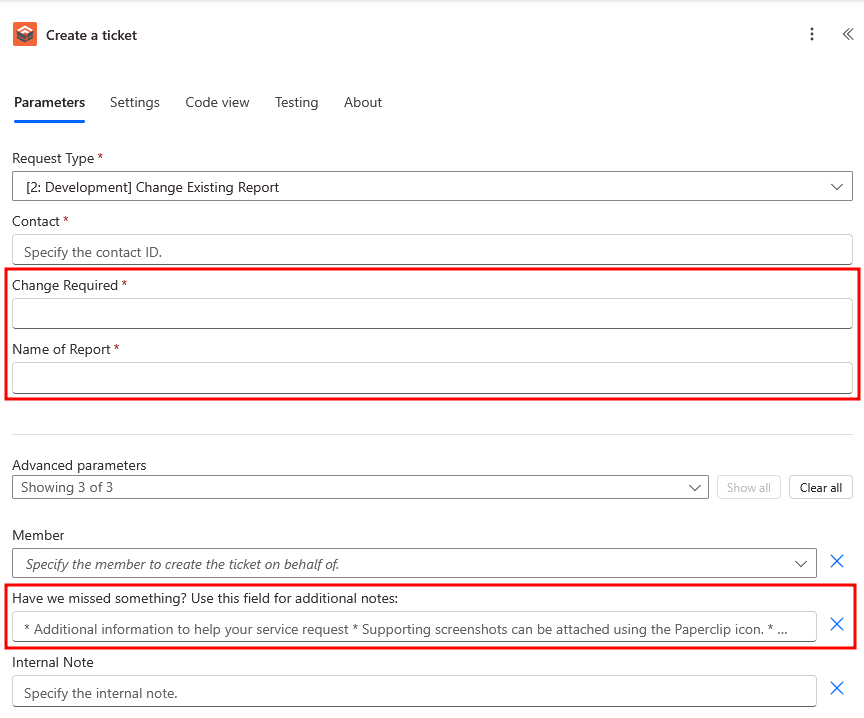
In addition to the above parameters, you will be presented with primary parameters for the required fields in your DeskDirector Service Type and advanced parameters for all the optional/non-required fields in your DeskDirector Service Type.
Create an email from template
This action generates an HTML document from a dynamic email template.
Parameters
Name | Type | Description |
Template | Dynamic List | String | The template that you will be using to create an email based on. |
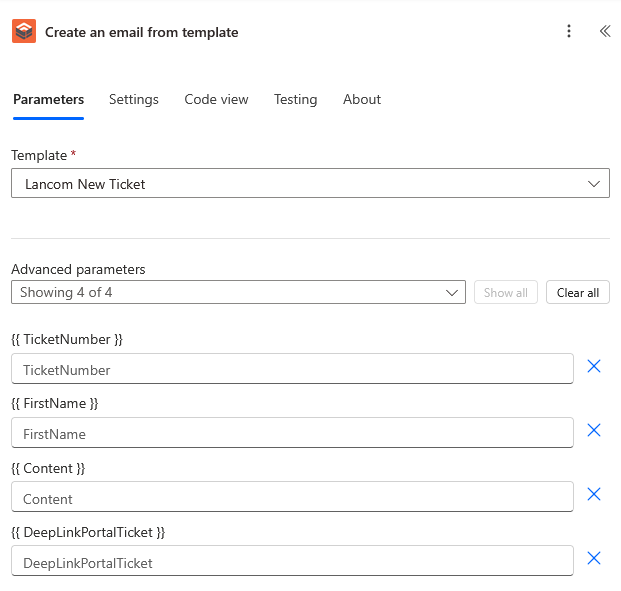
In addition, you will be presented with optional advanced parameters for all the tokens that you have set up in your custom template. These will be surrounded by curly braces (e.g. {{ token name }}).
Find companies
Retrieves companies for a set of filters.
Parameters
Name | Type | Description |
Search | String | A search term to use that will retrieve companies based on DeskDirector's standard searching (similar to the Client/TECH Portals). |
Tags | Multiple String | Define a tag to filter results, based on the tags configured within your DeskDirector instance. |
Skip | Integer | How many results to skip. (Needed when retrieving more than 1000 results.) |
Take | Integer | How many results to return. (A default value of 50, with options to set a value betwen 1 and 1000). |
Find contacts
Retrieves contacts for a set of filters.
Parameters
Name | Type | Description |
Company | Dynamic Picker | Integer | Pick a company (by ID) to filter for. |
String | Email for the contact to filter by. | |
Search | String | A search term to use that will retrieve contacts based on DeskDirector's standard searching (similar to the Client/TECH Portals). |
Tags | Multiple String | Define a tag to filter results, based on the tags configured within your DeskDirector instance. |
Skip | Integer | How many results to skip. (Needed when retrieving more than 1000 results.) |
Take | Integer | How many results to return. (A default value of 50, with options to set a value betwen 1 and 1000). |
Find members
Retrieves agents/members for a set of filters.
Parameters
Name | Type | Description |
Search | String | A search term to use that will retrieve agents based on DeskDirector's standard searching (similar to the Client/TECH Portals). |
Tags | Multiple String | An arbitrary set of tags to filter for. (Tags are those that you set in your DeskDirector instance.) |
Skip | Integer | How many results to skip. (Needed when retrieving more than 1000 results.) |
Take | Integer | How many results to return. (A default value of 50, with options to set a value betwen 1 and 1000). |
Find ticket task templates
Retrieves task templates for a set of filters.
Parameters
Name | Type | Description |
Search | String | A search term to use that will retrieve task templates based on DeskDirector's standard searching (similar to the Client/TECH Portals). |
Company | Dynamic Pickers | Integer | An ID for a company to filter for task templates based on. |
Tags | Multiple String | Define a tag to filter results, based on the tags configured within your DeskDirector instance. |
Skip | Integer | How many results to skip. (Needed when retrieving more than 1000 results.) |
Take | Integer | How many results to return. (A default value of 50, with options to set a value betwen 1 and 1000). |
Get a chat session
Retrieve a chat session based on its ID.
Name | Type | Description |
Session | Integer | The numerical ID for the chat session you are retrieving. |
Get a company
Get a company's details by ID.
Name | Type | Description |
Company ID | Integer | The numerical ID for the company you are retrieving. |
Get a contact
Get a contact's details by ID.
Parameters
Name | Type | Description |
Contact ID | Integer | The numerical ID for the contact you are retrieving. |
Get form result
This action returns the form entry by ID.
Parameters
Name | Type | Description |
Form | Dynamic List | String | Select or input the ID for the type of form that you want to retrieve details for. |
Result ID | Integer | The specific form result ID for the instance of that form that contains the information you want. |
Get a member
Get a agents's details by ID.
Parameters
Name | Type | Description |
Member ID | Integer | The numerical ID for the agent/member you are retrieving. |
Get a ticket
Get ticket details by ID.
Parameters
Name | Type | Description |
Ticket ID | Integer | The numerical ID for the ticket you are retrieving. |
Get ticket tasks
Get the set of ticket tasks currently assigned to a specific ticket.
Parameters
Name | Type | Description |
Ticket ID | Integer | The numerical ID for the ticket you are retrieving ticket tasks for. |
Invite users to chat
Invite a set of users (contacts or members) to a chat session.
Parameters
Name | Type | Description |
Session | Integer | The numerical session ID for the chat session you are retrieving ticket tasks for. |
Contacts | Multiple Integer | The numerical IDs for the contacts that you want to add to the chat session. |
Members | Multiple Integer | The numerical ID for the agents/members that you want to add to the chat session. |
Respond to an Advanced Event
When an advanced event of a specific type has occurred (or if you have found that event through other means), you can send a response to that event.
Name | Type | Description |
Category | Dynamic List | String | The category of the advanced event that you are responding to. |
Event | Dynamic List | String | The specific advanced event that you are trying to listen for. |
Event ID | Integer | The ID for the specific event occurance that you are going to be responding to on any run of the Flow. |
Run an advanced action
You can trigger advanced actions from the DeskDirector Connector that take multiple actions or perform complex tasks.
Name | Type | Description |
Category | Dynamic List | String | The category of the advanced action that you are responding to. |
Action | Dynamic List | String | The specific advanced action that you want to run. |
Send a notification to a contact
This action sends a notification to a contact in DeskDirector Portal.
Parameters
Name | Type | Description |
Contact ID | Integer | The contact's integer ID. |
Message | String | The message that will be sent to the contact. |
Ticket | Integer | The ticket's integer ID. |
Require Dismiss | Boolean | Specify whether the notification needs to be dismissed. |
Send a notification to a member
This action sends a notification to a member in DeskDirector tech.
Parameters
Name | Type | Description |
Member ID | Integer | The member's integer ID. |
Text | String | The short message to send to a member. |
Ticket | Integer | The ticket's integer ID. |
Require Dismiss | Boolean | Specify whether the notification needs to be dismissed. |
Send a system message in chat
Respond to a chat session with a message from the system.
Name | Type | Description |
Session | Integer | The session's integer ID. |
Message | String | A short system message that will appear for users in chat. |
Update a ticket
Update a ticket with new values.
Name | Type | Description |
Ticket | Integer | The ticket's Integer ID. |
Summary | String | Content to update for the ticket's summary/title. |
Board | Dynamic List | Integer | The board that you want to move a ticket to. |
Status | Dynamic List | Integer | The status that you want to transition the ticket to. |
Note | String | A note that you want to add to the ticket |
Internal | Boolean | Whether you want the added note to be internal only. |
Priority | Dynamic List | Integer | The priority that you want to escalate or de-escalate to. |
Resource | Integer | The ID for a resource that you want to add to the ticket. |
Contact | Integer | The ID for a contact that you want to assign to the ticket. (Replaces the existing contact.) |
User Group | String | The DeskDirector ID for the Contact/User Group that you want to move the ticket to. |
CC's | String | The semicolon(;) separated list of emails for additional contacts that you want added to the ticket. |