Getting Started with DeskDirector
DeskDirector Portals
Browser Support
What is the DeskDirector Admin Portal?
What is the DeskDirector TECH Portal?
What is the DeskDirector Client Portal?
Desktop Portal
Managing Your Account
Pricing & Subscription Plans
Deskdirector - Sign up walk through
Managing your DeskDirector Subscription
Admin Essentials
Release Notes
Permissions & Feature Configuration (ConnectWise/Autotask Partners)
Automatic Contact Creation
The Developer Corner
DeskDirector Features Overview
Logging in to DeskDirector
Desktop Portal Version Differences
Managing Tickets with DeskDirector
User Profiles & Profile Pictures
Office Hours
How Searching Works
Embedding Help Page Media
Get started with the DeskDirector Power Automate Connector
Featured Solution: Teams Ticket Discussion
Features
Portal Customization
Service Catalogue
Forms
Communication
Actionable Messages for Emails
Real-Time Chats
Notifications
Email Notifications
Email Template Engine
Surveys
Broadcasts
Generative AI
Ticket Summary for TECH Portal
DeskDirector with Generative AI
Setting up AI Service Providers
AI Assistants in DeskDirector
Custom Tools for AI Assistants
Knowledge Bases for AI Assistants
Set up Microsoft Foundry Agent Service with DeskDirector Portals
Advanced
Login & Authentication
Contact Groups
Accounts and Companies
Contacts
Approvals
Task Lists
The Learning Center
Tags
Custom Domains
File Storage
Portal Deep Linking
Service Dashboard
Auditing and Analytics
Integrations
ConnectWise
ConnectWise Custom Menu Item for DeskDirector Tech Portal
ConnectWise
ConnectWise Quotes & Invoices
ConnectBooster
ConnectWise - Avoid Aggressive Notifications
AutoTask
Switching or Merging PSAs
QuoteWerks
Wise-Pay
TimeZest
BiggerBrains
OneNote Notebooks
Integrations - Frequently Asked Questions
IT Glue
Microsoft Teams App
Featured Solution: Ticket Briefing
Introducing the DeskDirector for Microsoft Team App
Installing the Microsoft Teams App (Client Mode)
Installing the Microsoft Teams App (TECH Mode)
Setting up Tags for Teams Discussions (TECH Portal)
Branding the DeskDirector Teams App
DeskDirector Teams App Notifications
User Groups Integration with Microsoft Teams
Setting up Content Security Policy (CSP)
Advanced topic: Setting up Tech & Client Mode in the same tenancy
Integrating Microsoft Teams with DeskDirector Tech Portal
Smart Alerts for TECH Users
Microsoft Power Automate
Actions
Solutions
Power Automate Administration
Power Automate Connector - Setting up your first flow
DeskDirector Power Platform Connector Reference
Troubleshooting
Troubleshooting via Web Developer Tools
Diagnose Entities Tool
Troubleshooting DeskDirector Connection Issues
Permissions & Access - Common Issues
Tickets & Chats - Common Issues
ConnectWise Audit Trail - Exporting API Logs
Contact DeskDirector Support
Desktop Portal - Common Issues
Contact Impersonation
DeskDirector Desktop App - Installation Issues
Login & Authentication - Common Issues
Approvals - Common Issues
Email & Email Delivery - Common Issues
PSA Entity Syncing - Common Issues
PSA Integration - Common Issues
ConnectWise Integration - Common Issues
Autotask Integration - Common Issues
Microsoft Teams App - Common Issues
Security
Glossary
Archived
Table of Contents
- All Categories
- Microsoft Teams App
- Setting up Tags for Teams Discussions (TECH Portal)
Setting up Tags for Teams Discussions (TECH Portal)

Start a conversation in Teams from a DeskDirector Ticket
We can start a discussion in a Teams channel by adding a custom tag to a ticket.
This feature allows ticket agents to initiate an internal conversation within Microsoft Teams for specific tickets in the DeskDirector Tech portal. This feature provides a streamlined and efficient way for ticket agents to communicate and collaborate on resolving customer issues, allowing them to resolve issues more quickly and effectively.
Key Benefits
- Centralised Communication: Links DeskDirector tickets to dedicated Teams conversations
- Real-Time Collaboration: Team members can discuss tickets internally while maintaining customer service quality
- Streamlined Workflow with AI: Generate, review, and send customer replies directly from Teams with your AI Assistant
Setup
Here's a step-through on how to set up this feature:
- Browse to a Teams Channel with DeskDirector installed in TECH Mode
- From the menu items of the Team Channel, select your DeskDirector application, followed by Tag to chat
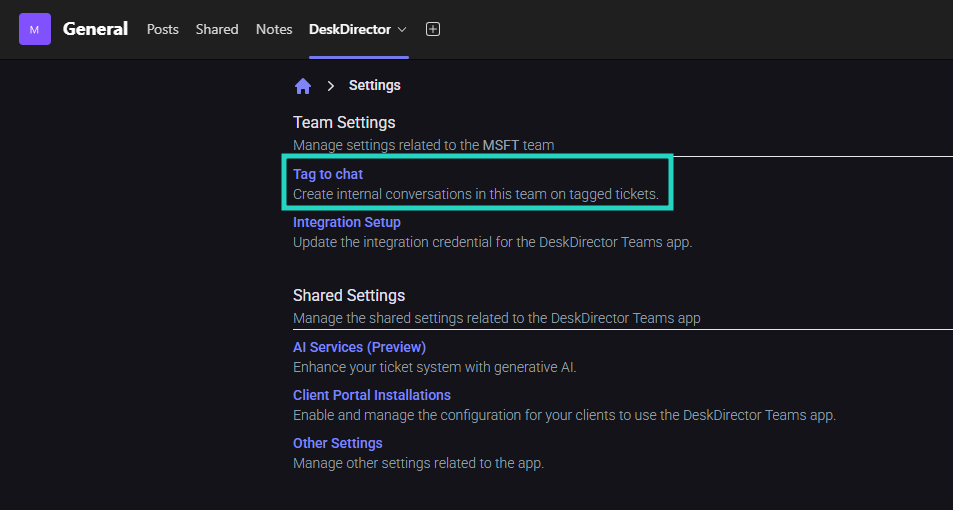
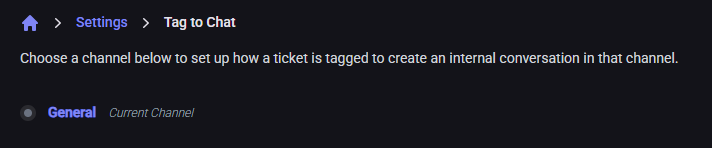
- Select from the available teams channels:
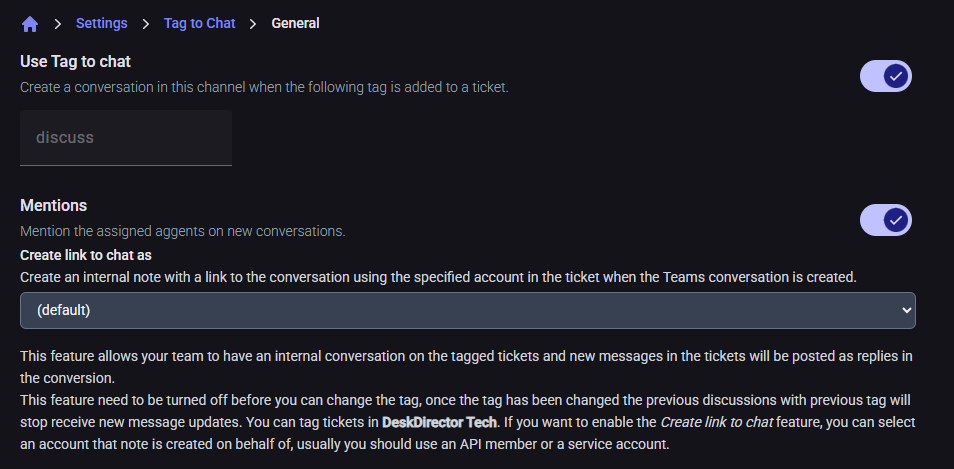
- Enter your preferred tag, followed by enabling the Use Tag to chat slider:
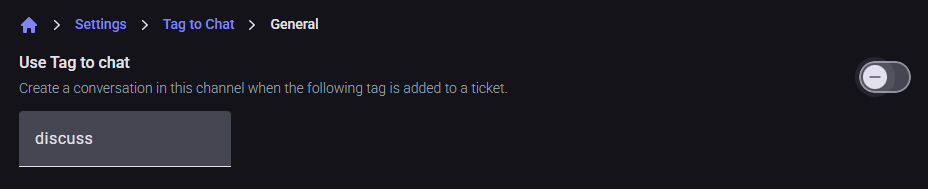
- The tag cannot be edited while the feature is enabled, to update the tag, you must first disable the feature
- Optionally, enable the Mentions feature
How to Create a New Conversation
- Open the Ticket in DeskDirector TECH Portal
- Navigate to the ticket you want to discuss internally
- Add the Configured Tag
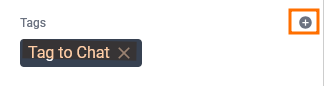
- Add the pre-configured "Tag to Chat" tag during your setup to the ticket
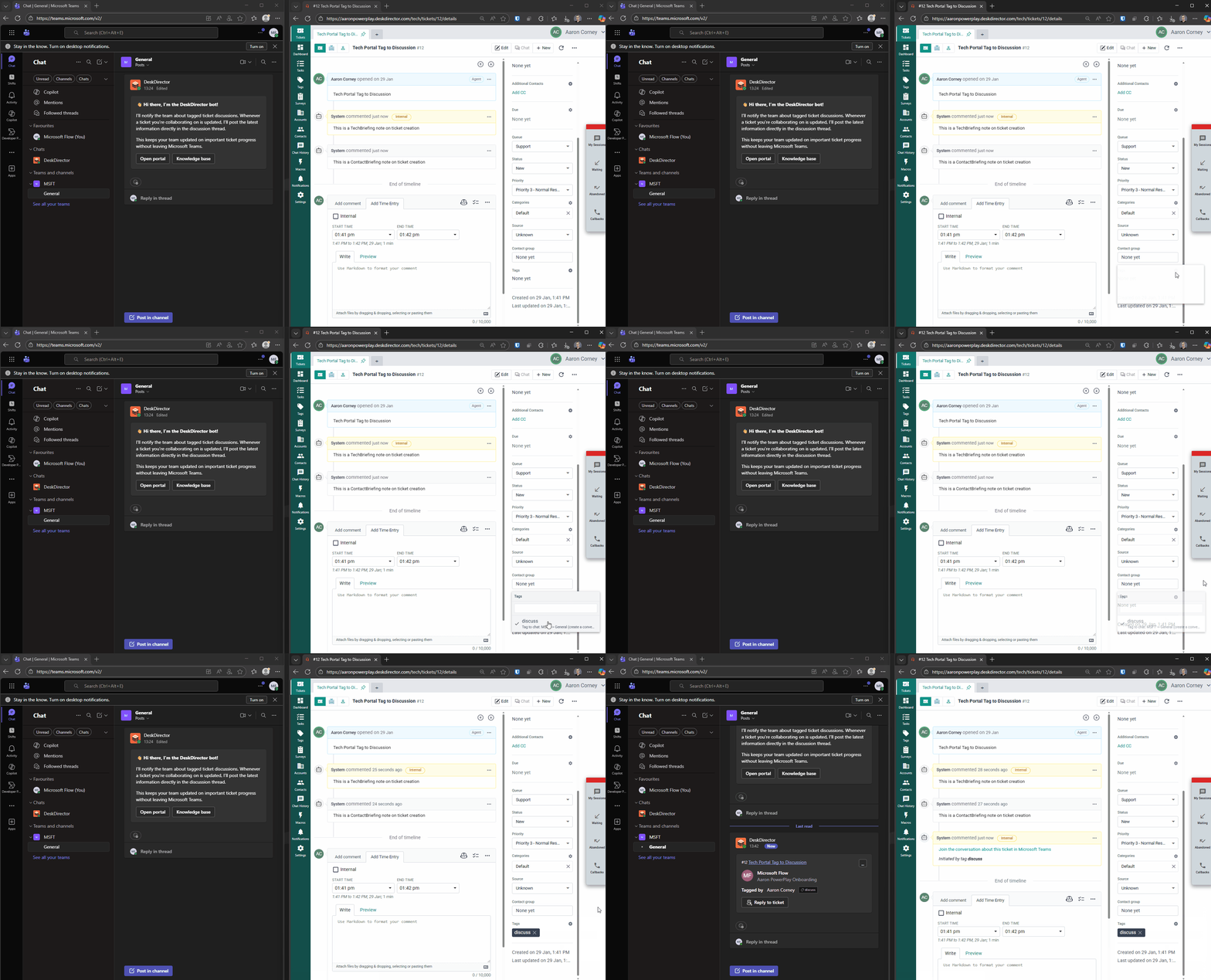
- Automatic Teams Conversation Creation

- The DeskDirector Teams app automatically creates a new conversation in the configured Teams channel
- The conversation is linked to the specific ticket
- Team Collaboration
- Channel members can now chat internally about the ticket
- All internal discussions remain separate from customer-facing communications
- Automatic Updates
- New messages added to the original ticket are automatically posted to the Teams conversation
- Team members stay informed of ticket updates in real-time
How to Generate AI-Assisted Replies
The AI Copilot feature analyses both ticket messages and internal Teams discussions, providing more informed suggestions based on your team's insights and expertise.
- Access the Copilot
- In the Teams conversation, click the "Reply to ticket" button on the first message
- This opens the AI Copilot interface
- Grant Permissions (First-time or Limited Access)
- If prompted, provide consent for accessing Teams messages:
- "Allow Once" - Grant permission for this session only
- "Always Allow" - Grant permanent access for all team members and future use
- If prompted, provide consent for accessing Teams messages:
- AI Analysis and Suggestion Generation
- The configured AI assistant for the ticket queue processes the request
- If no queue-specific assistant is configured, the default AI assistant is used
- The AI analyses:
- Complete ticket message history
- Internal Teams discussion messages
- Available knowledge base articles and tools
- Review and Refine
- Review the AI-generated reply suggestion and add any additional context or instructions
- Click "Request a New Suggestion" to get an updated response
- Send the Reply
- Review and edit the final suggested reply
- Click "Send Reply to Ticket" to post the response to the customer in the DeskDirector ticket
- Follow Up
- Click "View Ticket" once the reply has been sent to the ticket to open the embedded Tech Portal